📧 How to Send Your Order
To send your order, your computer needs to know which email app to use. This only needs to be done once.
Step 1:
When you click Request Quote, a window may pop up asking:
“Choose an app”
“Choose an app”
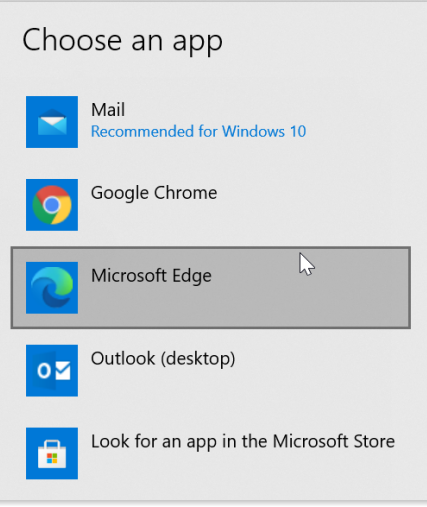
Example of what you might see
Step 2:
Click an email app such as:
- Outlook
- Gmail (Chrome / Edge)
Step 3:
If you see a checkbox that says:
“Always use this app”
✔️ Make sure it is checked.
“Always use this app”
✔️ Make sure it is checked.
Step 4:
Click OK or Allow.
Your email will now open automatically with your order filled in.
Your email will now open automatically with your order filled in.
⚠️ Important:
If you do not choose an email app, your order will not be sent. Once selected, you will not be asked again.
⬅ Back to Cart
If you do not choose an email app, your order will not be sent. Once selected, you will not be asked again.